Using unix_args.txt on Forge and NeoForge

Using unix_args.txt on Forge and NeoForge
Overview
If your pack uses a recent version of Forge or any version of NeoForge, Bloom reads unix_args.txt when you click Start in DuckPanel. This file tells Java (via flags) how to load the version of Forge or NeoForge your pack needs.
Which versions use it?
- Forge on Bloom uses
unix_args.txtfor Minecraft 1.17.1 and newer, starting with Forge 37.0.0. - NeoForge on Bloom uses
unix_args.txtfor all versions.
Where do I find unix_args.txt?
Open your server's File Manager in DuckPanel and go to Home. You'll find unix_args.txt directly in that directory, alongside your mods and config folders.
How do I change my startup flags?
For the versions listed above, make your changes in unix_args.txt instead of the Startup tab. Open the file in File Manager and leave the lines added by Forge or NeoForge in place.
NeoForge flags
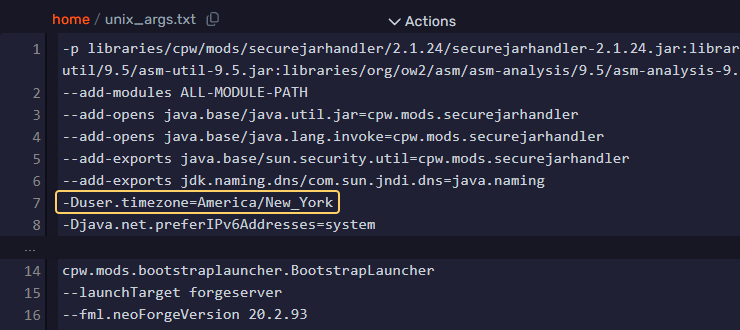
Find the first group of lines starting with --. Add a new line immediately after the last --add-exports entry. This puts your flag with the other Java flags, before the second group of options that starts with --launchTarget.
In our example, -Duser.timezone=America/New_York goes on line 7. To edit it, change the value on line 7. To remove it, delete that line.
Forge flags
Find -jar followed by your Forge JAR's name. Add your flag to the left of -jar on that same line, with a space between each argument. In our example, -Duser.timezone=America/New_York is at the start of line 1, and -jar forge-26.3-66.1.8-shim.jar is at the end.
To edit it, change only the flag's value. To remove it, delete just -Duser.timezone=America/New_York and leave the rest of line 1 in place.

Applying your changes
Click Save Content, then restart your server from Console for the changes to take effect.
What if the console says it couldn't open the file?
If you just uploaded a server pack, check where it was extracted. If you have to open a folder named after the pack before you can see unix_args.txt, move the contents of that folder into Home. Then go back to Console and click Start.
If the file is missing altogether, check which Forge or NeoForge build your pack requires. If it's NeoForge or Forge 1.17.1+ then you can install that build through Settings under Change Server Type. See our server software guide for the steps. By installing the server jar manually you'll also generate a fresh unix_args.txt.