ViaBackwards

ViaBackwards
Overview
ViaBackwards allows players using supported older Minecraft Java versions to connect to a newer server. It works alongside ViaVersion, which must also be installed.
This is useful if you've updated your server but want players to keep connecting from an older client version. We'll go over the requirements, installation, and compatibility limitations.
Requirements
ViaBackwards handles older clients from Minecraft 1.9 onward. If you also want to support 1.7 or 1.8 clients, you'll need ViaRewind.
You'll also need a compatible ViaVersion release at the same installation location. For platform and Java requirements, follow our ViaVersion setup guide.
The chart below gives an overview of how the Via plugins work together. Find your server version on the left, then look across to the version your players want to connect with. “VB” means ViaBackwards, and “VR” means ViaRewind.
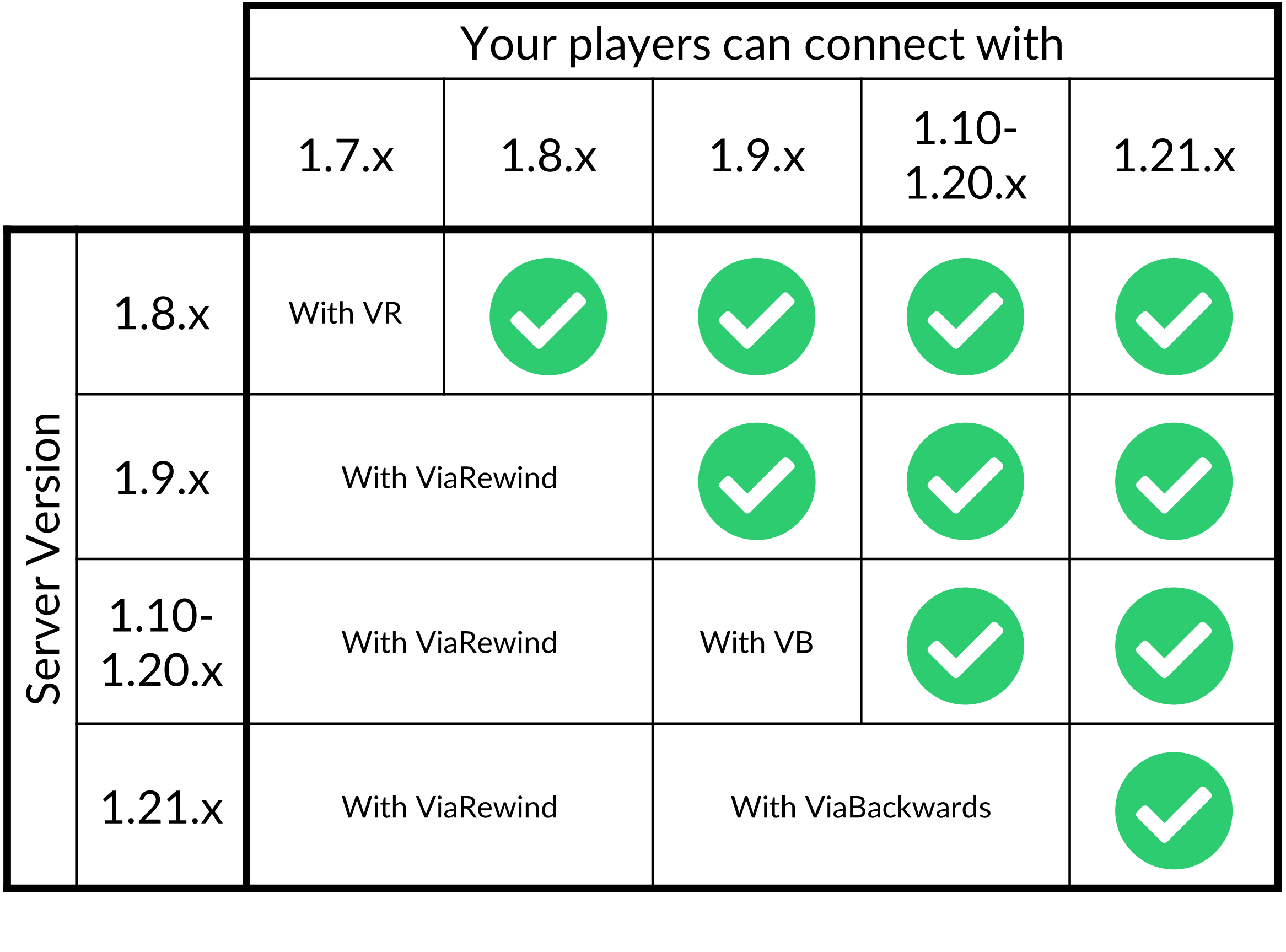
Keep in mind that this chart groups several versions together and only shows releases through 1.21.x. For your exact server and client versions, check the ViaSetup compatibility tool and the requirements explained in this guide.
Setup
First, download a compatible ViaBackwards release.
For Paper or Velocity, stop the server or proxy where ViaVersion is installed, then drop the ViaBackwards .jar file into the same plugins folder using the File Manager.
Start it again and check the console to confirm that both plugins loaded without errors. Once they're running, try joining with one of the older client versions you want to support.
If you haven't decided where to install the plugins on your network, check the installation location section. ViaVersion and ViaBackwards need to be installed together.
Compatibility
ViaBackwards translates server information into a format an older client can understand. Blocks, items, and entities that don't exist in that client may appear as replacements.
Keep in mind that this doesn't give the older client every feature of the newer version. Players may see different visuals or encounter limitations when interacting with newer content.
World height
Clients older than Minecraft 1.17 cannot see or interact with blocks below Y=0 or above Y=255. This matters if your world uses the expanded building height available in newer versions.
We recommend testing the areas and features your players use before deciding which older versions to support. If a version doesn't provide the experience you want, you can restrict it through ViaVersion's configuration.
For other limitations, check the project's known issues.
Configuration
ViaBackwards usually works with its default settings. On Paper, its configuration is located at plugins/ViaBackwards/config.yml.
The file contains options for how newer content is represented to older clients. Read the comments before changing a setting, then save the file and restart the server.
You can review the default configuration for more information.
Connection issues
If an older client cannot join, check that ViaVersion and ViaBackwards both loaded successfully and that their releases are compatible.
Also confirm that the client version is supported and isn't blocked in ViaVersion's configuration. For 1.7 or 1.8 clients, follow our ViaRewind guide to add the remaining plugin.
For further troubleshooting, see the ViaVersion connection issues section.