ViaRewind

ViaRewind
Overview
ViaRewind adds support for Minecraft Java 1.7 and 1.8 clients connecting to newer supported servers. It works alongside ViaVersion and ViaBackwards.
This guide will explain how to install it and what to keep in mind when allowing players to connect from these older versions.
Requirements
Current ViaRewind releases require both ViaVersion and ViaBackwards. All three plugins need to be installed together on the same server or proxy.
If you're using a proxy network and want to support 1.7 clients, use Velocity. Check ViaSetup before choosing where to install the plugins.
For platform and Java requirements, follow our ViaVersion setup guide.
The chart below gives an overview of how the Via plugins work together. Find your server version on the left, then look across to the version your players want to connect with. “VB” means ViaBackwards, and “VR” means ViaRewind.
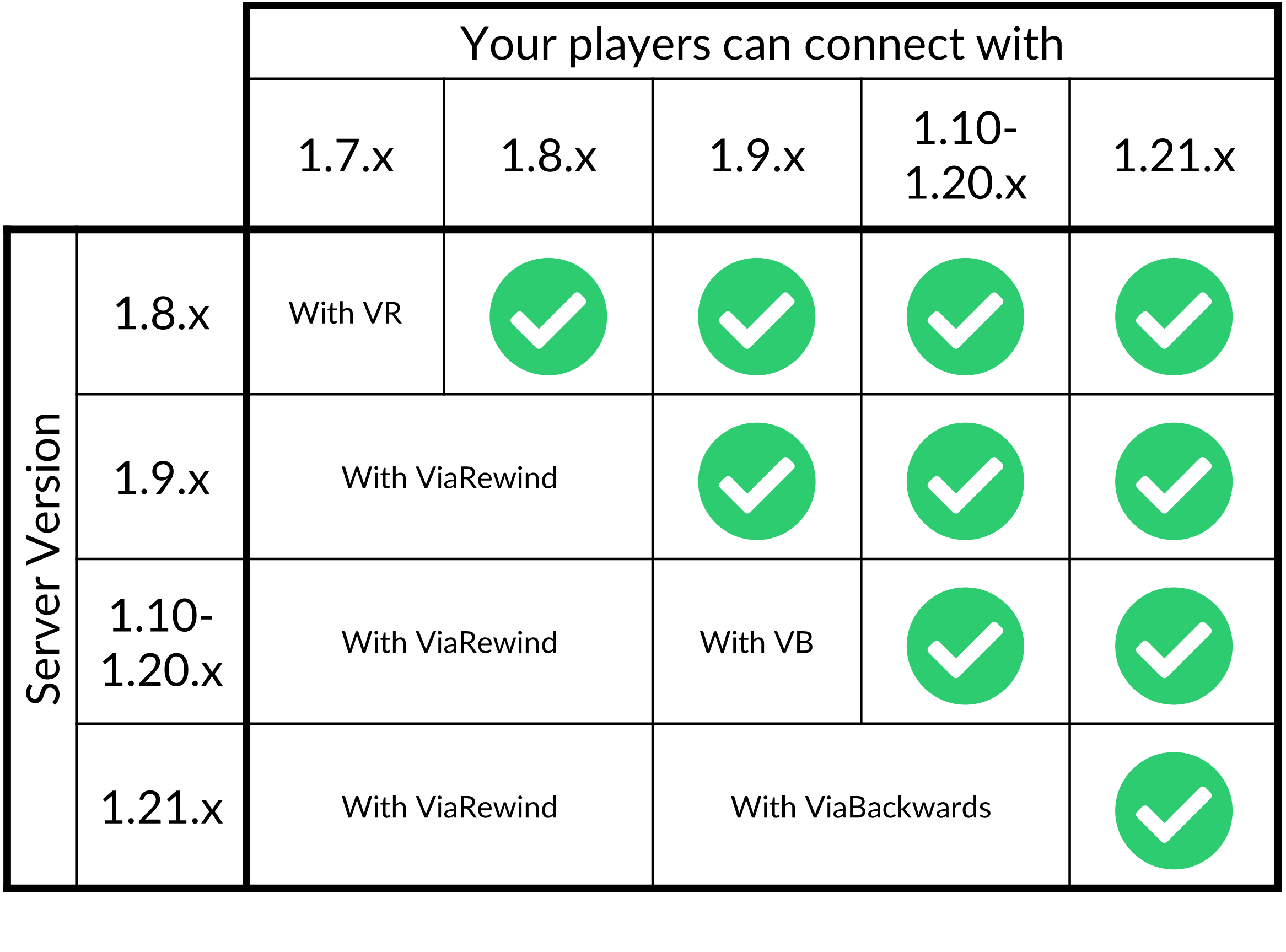
Keep in mind that this chart groups several versions together and only shows releases through 1.21.x. For your exact server and client versions, check the ViaSetup compatibility tool and the requirements explained in this guide.
Setup
First, download compatible releases of ViaRewind, ViaVersion, and ViaBackwards.
For Paper or Velocity, stop the server or proxy where you're installing them, then upload the .jar files into its plugins folder using the File Manager. If ViaVersion and ViaBackwards are already installed, check that their releases are compatible before adding ViaRewind.
Start the server or proxy again and check the console for errors. Once all three plugins have loaded, try connecting with the 1.7 or 1.8 client version you want to support.
If you need help choosing an installation location, refer to the ViaVersion guide. This is especially important if you're also using an anticheat.
Compatibility
ViaRewind helps older clients understand information from a newer server. Newer blocks, items, and other content may appear differently because those clients don't have the same features available.
Installing ViaRewind doesn't change your server's Minecraft version or restore the gameplay rules of an older server. For example, allowing a 1.8 client to connect doesn't automatically give your server 1.8 combat.
The older-client limitations covered in our ViaBackwards guide also matter here, including the restricted world height.
We recommend testing movement, inventory interactions, combat, and the areas your players will use before opening access to these versions.
Configuration
On Paper, you'll find ViaRewind's configuration at plugins/ViaRewind/config.yml. You can start with the defaults and adjust individual options if needed.
Cooldown indicator
ViaRewind can display the server's attack cooldown to 1.8 players. The following setting uses a title to show the indicator:
cooldown-indicator: 'TITLE'
Keep in mind that this controls how the cooldown is displayed. Disabling the indicator doesn't disable the server's attack cooldown.
Save the file and restart the server after making changes. For the available options and other settings, check the default ViaRewind configuration.
Connection issues
If a 1.7 or 1.8 player cannot join, first confirm that ViaVersion, ViaBackwards, and ViaRewind all loaded without errors.
Then check the exact server and client versions in ViaSetup, along with any version restrictions in ViaVersion's configuration.
For additional troubleshooting steps and support information, see our ViaVersion guide.